
Seating
Where the guests sit is the point at which a ceremony either works or turns into a problem. One seat in the wrong order can undo everything else you arranged.
Right, left, and the double centre
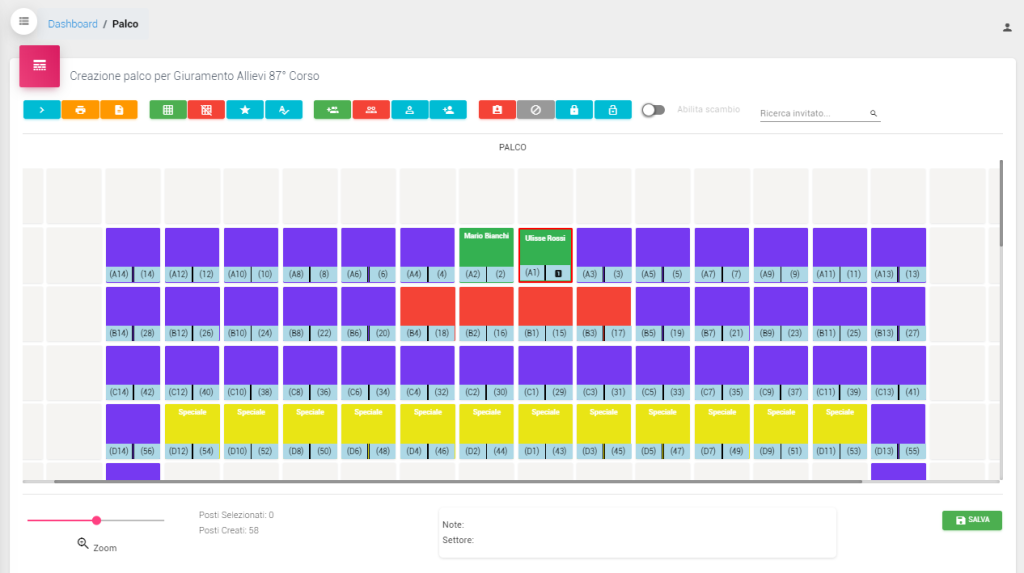
Once seat 1 is assigned, the place of honour, the second seat goes to the right of the person seated there and the third to their left, alternating outwards. When the front row has an even number of seats, or the seats carry equal weight, there is no single centre but a double centre: seat 1 goes centre-right and the rest follow, left then right.
CerimoniereWeb applies whichever rule the plan of your hall calls for, without you counting chairs.
The late confirmations
They cause more reorganisation than anything else: the guest who confirms at the last moment, and the one who mentions an accompanying guest a few hours before the ceremony.
In a hall that is already full you open up a seat and drop the new guest into it with one click. Guests who must not move get pinned: when the plan recalculates to make room for someone else, they stay exactly where they are.
What you carry into the hall
CerimoniereWeb prints the material you need on the morning of the ceremony:
- The whole hall, as a spreadsheet identical to what is on screen
- The seating list, ordered by seat or alphabetically, with name, photograph, office and, where relevant, the name of the person being represented. This is the one the ushers hold
- Place cards in several formats
- Folded name cards for the stage and the front rows
Stages, stands, tiered seating and conference rooms all work the same way. The plan is drawn once, seats are numbered from the place of honour outwards, and the ordering follows from there.
Want to see it working on your next ceremony?
We will show you CerimoniereWeb in use. If you go ahead, we configure your venue plan and your order of precedence ourselves, and we build the customisations your office needs.
Request a demonstration for your protocol office User manual